


PS Advanced NX
Seismic hazard parameters and response spectra to NTC 2018, right in the browser. Pick a site on the map to read ag, F0 and Tc* for every return period, then build elastic and design response spectra with an AI assistant at your side.
What it does
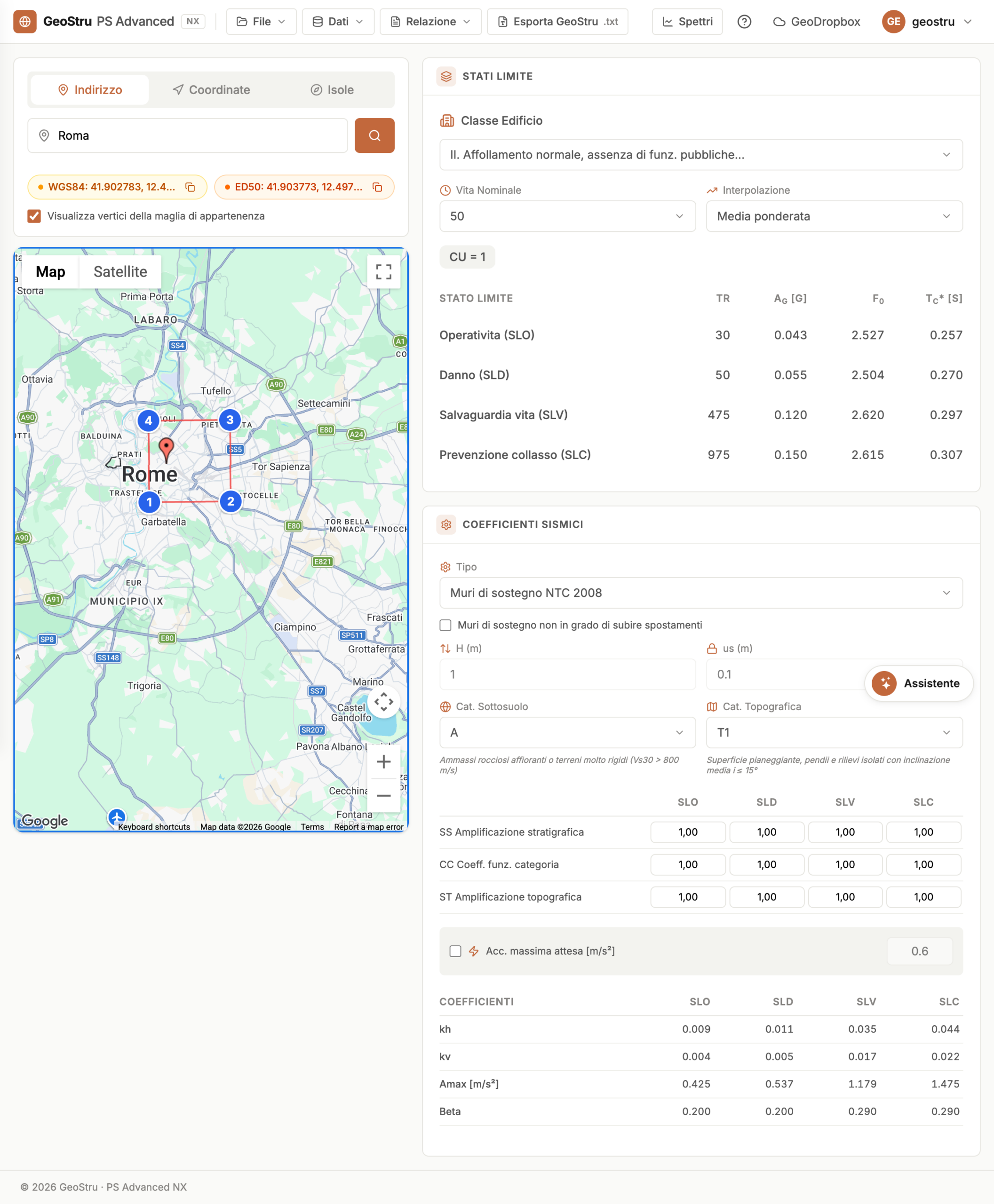
PS Advanced NX turns a point on the map into the full seismic input a project needs — the NTC 2018 hazard parameters for every limit state, elastic and design response spectra, and the seismic coefficients for geotechnical checks — with an AI assistant that fills them in for you.
NTC 2018 hazard grid — pick a location on the map or type coordinates and the app interpolates ag, F0 and Tc* from the official INGV national grid for every return period.
Response spectra for every limit state — elastic and design spectra for SLO, SLD, SLV and SLC, with soil category and topographic amplification, plotted interactively.
Seismic coefficients — horizontal and vertical seismic coefficients (kh, kv) and amplification factors, ready for pseudo-static geotechnical verifications.
AI chat assistant — an interactive assistant that answers seismic-domain questions and fills in the parameters for you, in several languages.
PDF report & GeoDropbox — export the spectra and parameters as a report and save or load your project from GeoDropbox cloud storage.
The seismic parameters
Every value comes from the official national hazard model and the NTC 2018 rules — nothing to look up by hand.
Hazard parameters — the peak ground acceleration ag, the spectral amplification factor F0 and the corner period Tc*, interpolated from the INGV MPS04 reference grid.
Four limit states — SLO (operational), SLD (damage), SLV (life safety) and SLC (collapse), each with its own return period from your nominal life and use class.
Amplification — the soil coefficients SS and CC for ground categories A–E and the topographic coefficient ST for categories T1–T4.
Response spectra — the elastic horizontal and vertical spectra and the design spectrum reduced by the behaviour factor q.
Seismic coefficients — the horizontal and vertical coefficients kh and kv (kh = βs · amax/g) for pseudo-static analysis.
How it works
A guided flow takes you from a point on the map to an exported report in seven steps.
1 · Site localisation — locate the site by interactive map, address search or WGS84 coordinates — including the minor islands with their dedicated values.
2 · Nominal life & use class — the reference period VR = VN · CU, from the nominal life VN and the use-class coefficient CU (0.7–2.0).
3 · Hazard parameters — ag, F0 and Tc* interpolated for the four limit states SLO, SLD, SLV and SLC.
4 · Soil & topographic category — the amplification from ground category A–E (SS, CC) and topographic category T1–T4 (ST).
5 · Response spectra — the elastic and design spectra, with the damping ratio ξ and the behaviour factor q.
6 · Seismic coefficients — the horizontal and vertical coefficients kh and kv for geotechnical verification.
7 · Report & export — a TXT or PDF report, saved to GeoDropbox for reuse across the NX apps.
Inputs and outputs
What you enter
Site — a point on the map, an address or WGS84 coordinates.
Structure data — nominal life VN and use class CU, which set the reference period and the return periods.
Ground — soil category A–E and topographic category T1–T4.
Spectrum options — the damping ratio ξ and the behaviour factor q for the design spectrum.
What you get
Hazard parameters — ag, F0 and Tc* for every limit state.
Response spectra — elastic and design, horizontal and vertical, plotted interactively.
Seismic coefficients — kh and kv for geotechnical checks.
Deliverables — a TXT/PDF report and a GeoDropbox project.
The AI assistant
PS Advanced NX has a seismic assistant built in, so the parameters are one conversation away.
Ask in plain language — the assistant explains hazard parameters, limit states and response spectra and answers seismic-domain questions.
Auto-fill — describe your site and structure and it sets the location, categories and spectrum options for you — in several languages.
Who it's for
Geotechnical and structural engineers · Geologists · Designers. PS Advanced NX gives anyone who needs NTC 2018 seismic input — hazard parameters, response spectra and seismic coefficients — a single web tool that goes from a point on the map to report-ready values for foundations, retaining works and buildings.
Why it's different
Runs directly in the browser — no installation, always up to date, with the official INGV hazard grid built in.
Every limit state (SLO, SLD, SLV, SLC) and both elastic and design spectra in one place.
Soil and topographic amplification and the pseudo-static coefficients kh and kv computed for you.
An AI assistant that answers questions and fills in the parameters, in several languages.
PDF/TXT reports and GeoDropbox projects, reusable across the NX suite.
Pay-as-you-go with NX credits — no subscription, shared across every NX app.
Frequently asked questions
What's the difference between the elastic and the design spectrum?
The elastic spectrum assumes fully elastic behaviour; the design spectrum reduces it by the behaviour factor q to account for the structure's dissipative capacity.
Which behaviour factor q should I use?
It depends on the structural type and ductility class; for geotechnical checks at the life-safety limit state (SLV), a value of q = 1.5 is common.
How do I choose the soil category?
From the equivalent shear-wave velocity in the top 30 m (Vs,eq), measured by geophysical or geotechnical investigation.
What are kh and kv for?
They are the horizontal and vertical seismic coefficients used in pseudo-static geotechnical verifications.
My site is on a minor island I can't find on the map.
Minor islands outside the continental grid have dedicated values — select them from the islands list.
Does the calculation consume credits?
Yes. Calculations and exports use NX credits according to the app's pricing.
Ready to start with PS Advanced NX?
PS Advanced NX runs on GeoStru NX credits — top up once and use them across every NX app. It runs in the browser, is always up to date and needs no installation.